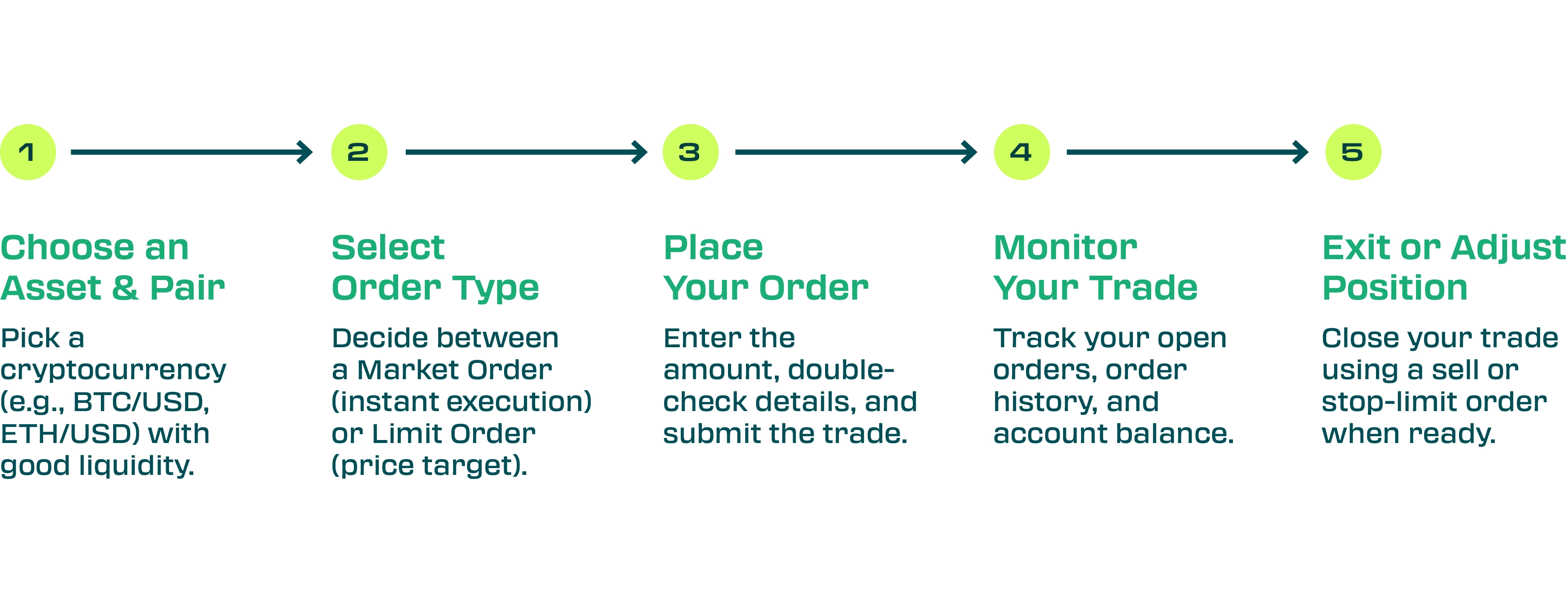
Step 1: Choose an Asset and Trading Pair
First, pick a cryptocurrency that’s liquid and well-known. Popular coins like Bitcoin or Ethereum trade with high volume on many platforms. Higher liquidity means you can enter and exit easily with less delay or price slippage. Always double-check you’ve chosen the correct pair before proceeding.
Step 2: Understand Market vs Limit Orders
Next, decide how to place your order. The two basic order types are:
- Market order: You buys or sell immediately at the best available price. This guarantees your trade will execute right away ,provided there’s enough liquidity, but the exact price isn’t fixed – it will be the best current bid or ask. In fast-moving markets, you might get a slightly different price than what’s displayed.
- Limit order: You specify the price you want. A limit buy order will only execute at or below your set price; a limit sell order only executes at or above your price. For example, if you want to buy BTC at $40,000 and it currently trades at $41,000, you could place a buy-limit at $40,000. The trade will sit open until the market price drops to $40K (or you cancel it). Limit orders give you price control, but there’s no guarantee the market will hit your target.
Many platforms also offer stop-loss or stop-limit orders for automatic exits (e.g. sell if price falls to a certain point), which can help manage risk.
Step 3: Place Your Order
On your platform’s trade screen, select the pair and order type, then enter the amount to buy or sell. For example, if you’re buying Ethereum with USD, pick the ETH/USD pair. A tip: once you’ve chosen the pair and order type, “double-check the amount you want to buy and the current price of the asset, then hit ‘Buy’ (or ‘Sell’ if you’re exiting)”. If you placed a market buy, the order should fill almost immediately – you’ll see the new crypto balance in your account. If you used a limit buy, the order will appear in your “open orders” list and will fill only if the market reaches your price. You can usually see these pending orders on the same trading interface.
Step 4: Monitor the Trade
After submitting your trade, keep an eye on your order. A market order typically shows up as “filled” almost instantly, while a limit order stays open until (and unless) it executes. Most platforms provide an order history or trade history view to track open orders and balance changes, your profits, losses, and trading fees”. If your limit order isn’t filling (maybe the price isn’t moving), you can cancel and adjust it. Checking the history also confirms exactly when your trade happened and at what price.
Step 5: Exit the Trade
When it’s time to close your position (i.e. sell your crypto), you’ll do the reverse process. Place a sell order for the asset. Again you can use a market sell (instantly sell at current price) or a limit sell (set a desired price). For example, if you want to lock in gains, you might place a sell-limit at your target price, which will only execute at or above the price you set. If you need to exit quickly, a market sell is faster but could suffer slippage in a low-volume coin.
It’s wise to plan your exit in advance. Consider setting a stop-loss order to automatically sell if the price drops too far, limiting potential losses. Similarly, a take-profit (a sell-limit at a profit target) locks in gains if the price rises to your target.
Once your sell order fills, the crypto is converted back to USD and sits in your account balance.
FAQs
Which order type should I use first?
Beginners often start with a market order because it executes immediately and is simple to use. Just keep in mind the price you pay may move slightly as the order fills. A limit order gives you precise price control but may not execute quickly (or at all) if the market never hits your target.
How do I know when a trade closes?
Your trade is “closed” when your sell order fully executes. You’ll see the executed transaction in your trade history or order book. Exchanges usually mark orders as filled or partially filled. If fully filled, your crypto has been sold (or bought) and the new balance (fiat or crypto) will appear in your account.
Can I cancel an order after placing it?
Yes, as long as it hasn’t been executed. You can cancel any open limit order through your platform’s pending orders interface. Once canceled, the order is removed. Market orders cannot be canceled once submitted because they execute immediately.
What is a trading pair?
A trading pair shows which asset you’re buying and what you’re paying with. For example, the pair BTC/USD means you buy Bitcoin using US dollars. A pair like ETH/USDT means you buy Ether using the stablecoin Tether. Always make sure you select the correct pair (e.g. BTC/USD vs ETH/BTC) before trading.
What if my limit order never fills?
Then it simply remains open until it’s canceled or expires. You can adjust or cancel the order at any time. If the market never reaches your limit price, you’ll just keep your original funds. Some traders periodically move their limit order closer to the current price if they really want execution.
What is slippage?
Slippage is when your executed price differs from the price you saw when placing the order. This happens when markets move quickly or have low liquidity. For instance, if you place a market buy, the price might rise as your order is filling, so you pay slightly more on average. Using highly liquid coins helps minimize slippage.
How much will I pay in fees?
Most platforms charge a small trading fee (often 0.1–0.5%) on each buy or sell. Fees depend on the exchange and sometimes your monthly volume. Some platforms have different fees for (limit orders and market orders trades. Always check the fee schedule of your platform. You can also view fees incurred on each trade in your history.
What is a stop-loss order?
A stop-loss is an order that triggers a market sell if the price falls to a specific level. It’s designed to limit losses – for example, “sell if BTC drops to $95,000.” Once triggered, it becomes a market order and sells at the best price. This is not guaranteed exact price execution (a sharp drop could sell lower), but it automates the exit.
What is a take-profit order?
A take-profit is often just a sell-limit at your target price. For example, if you buy at $90,000 and want a 10% gain, you might place a limit sell at $99,000. When the market reaches that price, the order executes and you lock in profit.
What is a partial fill?
If your order is larger than the available amount at the specified price, it might fill only part-way. For example, if 1 BTC is available at $90,000 but you placed a market order for 2 BTC, the first 1 BTC order fills at $90K and the next 1 BTC sells at the next best price. The remaining portion of your order continues to fill at progressively lower (for sells) or higher (for buys) prices until complete.
How do I track my trade?
Your platform will have an “order history” or “trade history” section. Here you can see every executed trade (buy/sell) and any open orders. Check this to confirm executions, prices, and any partial fills. Keeping an eye on this helps you understand what happened in your trade.
Is trading crypto safe?
Crypto markets can be volatile, so trading always carries risk. Security-wise, use strong passwords, and be wary of phishing. A lack of regulation can expose investors to scams, fraud, and market manipulation.
What do I do after the trade?
After exiting, review your trade history. Many traders analyze their trades to learn what worked and what didn’t. Tracking profits, losses, and even fees can help refine your strategy. Make a habit of reviewing past trades to improve over time.